Showing posts with label #myfavfriday. Show all posts

Friday, August 31, 2012

#myfavfriday - My Department

Ok, so I know it might sound kind of cheesy but I LOVE my department. I couldn't ask for a better group of people to work with or to spend most of my days with.


It makes it really nice to go into work when you have a group of people that you can count on to make your day enjoyable. We aren't just colleagues, we're friends too and how much better can work get than being able to work with your FRIENDS?!

I also know that I can go to any one of the members of my department for anything. I might be struggling with a student or maybe having trouble helping the kids understand a topic and I can always count on my department members to be there to help, offer suggestions and guidance.

So for #myfavfriday I am shouting out my department members!!! YOU GUYS ROCK :)

Saturday, August 25, 2012

#myfavfriday (on Saturday) - TI Connect and TI SmartView

So I'm a day late (my best friend had her first baby yesterday..welcome to the world Maddison!!!), but I still wanted to post. First day back for teachers is Monday and first day back with the kiddos is Wednesday, but I definitely can't complain because I know so many people have already been teaching for weeks. 

I went into my classroom yesterday to try to get a little more prepared for the start of school. I got a couple bulletin boards all set and I think I FINALLY have figured out my first day activities. I still have quite a bit of work to do, but we are getting some time in our rooms during one of the PD days and I can always stay late to get everything else finished. 

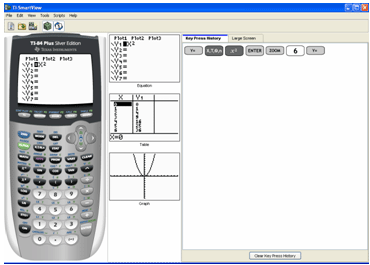
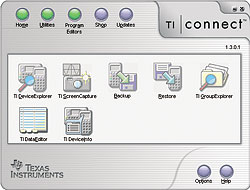
So for #myfavfriday this week I wanted to post about one of my favorite pieces of technology we use at school. We have TI-SmartView and TI-Connect on our computers and they are both awesome! 


SmartView is large interactive calculator that is projected on the screen. On the other side of the screen you can show the keystrokes as you push the buttons on the calculator or you can show a bigger version of the screen of the calculator. It also simultaneously shows three different screens in the middle, which can be changed to a few different options. I keep them set at the defaults which are the "y=", the table and the graph screens.

I know that before I had TI-SmartView whenever I was doing anything on the calculator with the kids I would have to walk around with my calculator in hand trying to show the kids what buttons to push and what my screen looked like. Not very efficient and usually frustrating (for both me and the kids). 

My favorite part of this technology is how the kids can see the connection between the equation, table and graph all at the same time and can see how different changes affect the other pieces. 


TI-Connect is a linking software. You can download and upload to and from your calculator, backup data, and even take screen shots. I use the "screen capture" feature a lot for creating graphs/images for assignments, tests, quizzes, etc... I also have the students use the TI-Connect for different assignments where they can "hand in" their work, graphs, data (so many options!!) from their calculators. I also like having the screen shots because students can then refer back to something they did on their calculator and printed out, which would otherwise be lost forever (or would need to be re-done). 

Friday, August 17, 2012

#myfavfriday - Homework Calendars


Sooooooo for this edition of #myfavfriday I'm kind of following up from my most recent Made 4 Math post and focusing again on my strategies for managing absent students and make-up work. I like to have a go-to place for students to find out what homework they may have missed while they were absent. I keep three (three because I have three different preps) monthly calendars posted in the front of the room (again RIGHT near the door, so the students have noooooo excuse for missing it!!) where each day I write down what the homework assignment was for each class. I also write whether there was some sort of assessment as well.

I have totally stolen this idea from my very own Geometry teacher from when I was in high school. I liked the idea so much back then, that I knew I would incorporate it into my own classroom once I had one. (Did I mention that I have known since I was 15 years old that I wanted to be a math teacher? I feel so lucky to have known at such a young age and with such certainty what I wanted as a career!).

I totally love, love, love this because when a student comes back from an absence (whether it is one day or a prolonged period of time) they already know where to look for the answer to their question "What did I miss?" or if they ask me what they missed while they were out all I have to do is direct them to the calendar. I also like it because the students have access to an entire month's worth of past assignments, again which is helpful for those students that are absent for prolonged periods of time.

I wish I had some pictures of this board to post, but I haven't been able to go into my classroom since last week. This week I have been working in a curriculum consortium to help districts align to CCSS. Fun fun fun!!


Friday, August 3, 2012

#myfavfriday In a Million Words or Less...


With the beginning of the new school year (quickly..eeek!!) approaching I wanted to share one of my favorite "first day of school" activities. A few years ago (my second or third year teaching) I was trying to find some fun activities that would help my students get to know each other, but also help me get to know some things about them. I had created a "get-to-know-you" bingo game, which was good at getting the kids talking and learning some interesting things about each other, buuuuuut I wanted more.

That was when I found this activity for parents called "In a Million Words or Less..." Basically, I write a letter asking my students' parents to complete a "homework" assignment about their child (or children because I have had siblings before!). The title of the activity is pretty self explanatory...parents can write as much or as little as they want about their child and I give them no restrictions about what to tell me. I want to know what THEY think is important for me to know, not what I might think is important to know about their child (plus, I get that information from my "Who Are You?" student surveys).

In a Million Words or Less...

This is one of #myfavfriday activities because I LOVE getting the responses back from parents!!!! I enjoy reading what they have to say about their children because it gives me a different perspective and I usually find out some little tidbit that I may not have ever learned otherwise. I also love this activity because it starts a positive parent-teacher relationship which is helpful throughout the rest of the school year.

Soooooo, have you guys heard of this before? Has anyone else done it before? What do you think about it?